That's the core problem continuous vulnerability scanning addresses. It's an automated, recurring process that discovers weaknesses, evaluates risk, and supports remediation as systems change — not a one-time health check.
This article is written for enterprise security teams, critical infrastructure operators, manufacturers, government contractors, and anyone managing mixed Windows/Linux environments where asset visibility, uptime, and compliance evidence all matter at once. We'll cover how continuous scanning works, what it actually detects on each operating system, and how teams should use the results once they come in.
Key Takeaways
- Continuous scanning maintains an ongoing view of vulnerabilities, exposed services, and asset changes, not a single snapshot in time
- Effective programs combine discovery, authenticated assessment, risk-based prioritization, remediation, and verification
- Scanning supports compliance evidence but does not replace patch management, EDR, SIEM, or penetration testing
- Windows and Linux assets need different collection methods due to package managers, permissions models, and patch cycles
What Is Continuous Vulnerability Scanning for Windows and Linux Assets?
Continuous vulnerability scanning is the automated, repeated assessment of Windows and Linux endpoints, servers, workstations, and virtual machines for known security weaknesses and changes in posture.
The goal is straightforward: find out what assets exist, determine which weaknesses affect them, prioritize what matters most, and close gaps before someone else finds them first.
The difference from periodic scanning comes down to responsiveness. A quarterly scan gives you a picture of your environment as it existed on scan day. A continuous program reacts to:
- New assets joining the network
- Software or configuration changes on existing systems
- Newly published CVEs and vendor advisories
- Recurring collection cycles that don't wait for a calendar date
Related Terms Worth Clarifying
These three terms get used interchangeably, but they're not the same thing:
- Vulnerability scanning identifies weaknesses on a system
- Vulnerability management adds prioritization, ownership, and remediation tracking on top of scanning
- Continuous monitoring can extend further still, pulling in configuration drift, behavioral signals, or threat telemetry beyond CVE detection alone
Why Continuous Scanning Matters in Windows and Linux Environments
Mixed environments are harder to secure than single-OS shops, full stop. Windows and Linux assets differ in OS versioning, package managers, running services, permissions models, authentication methods, patch cycles, and often who actually owns them administratively. That fragmentation is exactly where gaps hide.
Incomplete inventory is the most common root cause of missed exposure. Unmanaged servers, remote workstations, forgotten VMs, legacy systems, and temporary test assets all tend to live outside the "official" inventory until something goes wrong.
Continuous scanning helps catch what periodic scans miss:
- Newly introduced assets and software changes
- Exposed ports and insecure services
- Outdated packages and missing patches
- Configuration drift as environments evolve
The Exploitation Timeline Is Shrinking
Here's why the gap between scan cycles matters more than it used to. In a 2024 study of 138 vulnerabilities exploited in the wild during 2023, Mandiant's exploitation study found that among n-day vulnerabilities (those exploited after a patch was already available), 29% were exploited within one week of patch release, and 56% within a month.

If your scan cadence doesn't keep pace with that timeline, you're finding out about exposure after attackers already have.
Compliance Value, Without Overstating It
Several frameworks reference vulnerability scanning directly, but none treat it as a complete compliance solution on its own:
- NIST SP 800-53 (RA-5) requires monitoring and scanning at an organization-defined frequency, plus analysis and remediation within defined response times (scanning is one of three required activities, not the whole requirement)
- CMMC Level 2 (RA.L2-3.11.2) requires scanning periodically and when new vulnerabilities are identified, with remediation tied to risk assessments
- HIPAA's Security Rule requires risk analysis and periodic evaluation, but doesn't prescribe a specific scanning interval
- SOX-related IT general controls focus on whether controls supporting financial reporting remain effective, not a standalone scanning mandate
The practical value is operational: continuous results let you assign ownership, set remediation priorities, document exceptions, and produce audit-ready evidence without maintaining it all in a spreadsheet.
How the Continuous Vulnerability Scanning Process Works
The end-to-end flow looks the same regardless of platform: discover and identify assets, collect system and software data, compare findings against vulnerability intelligence, prioritize risk, route remediation, and verify the fix. What differs is the data collected on each operating system.
What Gets Collected from Windows and Linux
From Windows assets, scans typically gather:
- OS build and update status
- Installed applications and running services
- Open ports, local policies, accounts, and permissions
- Relevant security configuration settings
From Linux assets, scans typically gather:
- Distribution and kernel version
- Installed packages and configured repositories
- Running services, listening ports, users, and groups
- File permissions, privilege assignments, and configuration state
Authenticated vs. Unauthenticated Scanning
Authenticated scans use credentials to log into a host and inspect it from the inside, revealing deeper, host-level findings. Unauthenticated scans look at a system the way an outsider would, with no credentials and only what's reachable over the network. Most mature programs use both: authenticated for depth, unauthenticated for an external-attacker perspective.
Agent-Based vs. Agentless Collection
Agent-based scanning installs lightweight software on each host. That approach fits remote, off-network, or transient assets that aren't always reachable.
Agentless scanning works over the network without installing anything locally. It can be simpler to deploy, but it depends on network reachability and credentials.
The right choice depends on asset criticality and how much the environment tolerates installed software.
The Five-Step Cycle
- Discover and inventory assets: Use network discovery, installed agents, credentials, APIs, and virtualization data. Reconcile duplicate or stale records against a single source of truth so the same laptop doesn't show up as three different assets.
- Collect technical evidence: Map software versions, packages, services, and configurations against CVE records and vendor advisories. Finding a vulnerable version isn't the same as proving it's being actively exploited.
- Score and prioritize findings: Weigh severity, exploitability, asset criticality, network exposure, and compensating controls. CISA's Stakeholder-Specific Vulnerability Categorization (SSVC) model and FIRST's EPSS scoring both go beyond a bare CVSS number by factoring in exploitation likelihood and context.
- Route to remediation: Apply patches, package updates, configuration changes, service removal, access restrictions, isolation, or documented risk acceptance when a fix isn't immediately possible.
- Verify the fix: Rescan the asset, confirm the vulnerable version or configuration is gone, and document residual risk.

A quick example: a Windows server flagged for a missing security update gets patched, then rescanned to confirm the build number reflects the update. A Linux server running an outdated OpenSSL package gets the package updated through its distribution's repository, then rescanned to confirm the installed version no longer matches the vulnerable one. Both close out the same way: verification, not assumption.
Where Continuous Vulnerability Scanning Is Applied and What Affects Results
Continuous scanning covers Windows endpoints and servers, Linux servers, virtual machines, data center assets, and remote systems. It also applies to hybrid infrastructure and manufacturing environments where IT and OT networks sit close together.
Certain events should trigger a scan regardless of schedule:
- New asset onboarding
- OS or package changes
- Major configuration changes
- Newly disclosed critical vulnerabilities
- Network exposure changes
- Incident response activity
Getting Frequency Right
There's no single universal cadence. Major frameworks still point in the same direction:
- CIS Control 7 recommends scanning internal assets quarterly or more often, and externally exposed assets monthly or more frequently
- CISA's BOD 23-01 requires automated asset discovery every 7 days and vulnerability enumeration every 14 days for federal civilian networks
Exposure and criticality should drive frequency, not a fixed calendar.
Factors That Affect Accuracy and Results
| Category | What to watch |
|---|---|
| Accuracy inputs | Current inventory, vulnerability intelligence, reliable credentials, configuration baselines |
| Operating conditions | Bandwidth, scan intensity, maintenance windows, fragile legacy systems |
| System dependencies | Agents, firewalls, directory services, ticketing, SIEM, patch platforms |
| Scale and throughput | Concurrent assets, distributed sites, duplicate findings, alert volume |
| Regulatory constraints | Least-privilege access, change control, evidence retention, approval requirements |
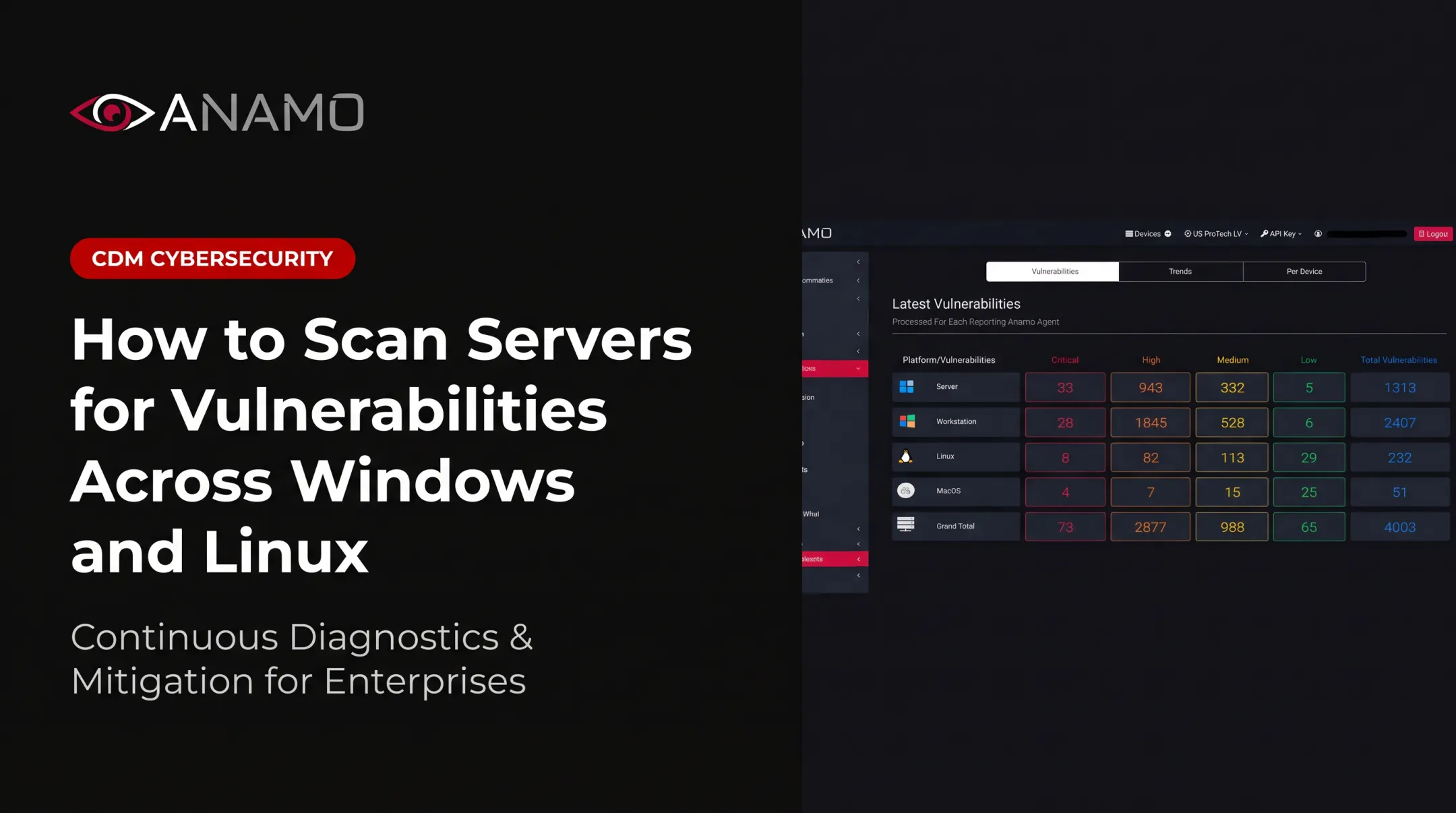
A unified platform keeps these factors manageable. Anamo runs as a lightweight agent across Windows, Windows Server, RHEL, CentOS, and Ubuntu systems, plus workstations and virtual machines, feeding one OS-CVE dashboard instead of several disconnected tools.
New targets can be added without standing up a separate scanning stack. Findings flow into the same dashboards, alerts, and remediation views used for the rest of the environment.
Common Issues, Misconceptions, and When Continuous Scanning May Not Be Appropriate
"Continuous" doesn't mean every asset gets scanned every second. It means recurring assessment, event-driven checks, and updated vulnerability intelligence on a risk-based schedule — a meaningful difference that gets lost in marketing language.
Where Programs Actually Break Down
- Incomplete or outdated credentials
- Inaccurate asset inventories
- Unsupported operating systems
- Network segmentation blocking scan traffic
- False positives and duplicate findings
- Weak ownership — findings reported but never assigned
- Issues that get flagged repeatedly but never remediated
A high CVSS score doesn't automatically mean urgent action. Business risk depends on exposure, asset role, whether an exploit exists in the wild, and what compensating controls are already in place. A critical vulnerability on an isolated test VM is a different problem than the same vulnerability on an internet-facing server.

Scanning also has real limits. It can't reliably catch every zero-day, prove an asset hasn't been compromised, or replace behavioral detection, endpoint protection, penetration testing, or incident response. These are complementary controls, not substitutes for each other.
When to Adjust the Approach
Some environments call for more caution:
- Fragile legacy systems that weren't built to handle active probing
- Safety-sensitive OT environments, where NIST guidance favors passive monitoring and scheduling active scans during planned outages
- Systems with strict maintenance windows
- Disconnected or air-gapped assets
In these cases, passive collection, authenticated and agent-based methods, or scheduled scanning windows are often safer than unrestricted active scanning.
Useful metrics to track include asset coverage, authenticated scan coverage, scan completion rates, remediation time, reopened findings, and false-positive rate. CIS defines several of these formally — worth checking their exact definitions rather than guessing at your own benchmark.
Conclusion
Continuous vulnerability scanning keeps an evolving view of Windows and Linux assets, known weaknesses, configuration changes, and remediation status that a point-in-time scan simply can't offer. The real value comes from the full cycle: accurate discovery, meaningful assessment, risk-based prioritization, accountable remediation, and verification. Scan volume alone doesn't fix anything.
If you're managing a mixed Windows/Linux environment across enterprise, critical infrastructure, or regulated government contracting work, a unified, always-on CDM-SIEM approach often fits better than stitching together separate tools.
Anamo's platform brings continuous risk assessment, CVE visibility, dashboards, and remediation support into one interface built for Windows, Linux, servers, and virtual machines. Reach the team at Sales@Anamo.io or 949-629-3900 to see how it fits your environment.
Frequently Asked Questions
What is the best way to perform continuous scanning for large batches of documents?
This article covers continuous scanning of IT assets, not document digitization. Large-scale asset assessment relies on automated discovery, distributed collection, scheduling, prioritization, and centralized reporting rather than document-processing tools.
What does continuous scanning mean?
It means systems and assets are assessed repeatedly or when relevant changes occur, so new vulnerabilities and configuration drift get identified sooner than with point-in-time, scheduled scans.
What are the three types of scanning?
Network-based, host-based, and application or service-level scanning are the three common categories. Teams also classify scans as authenticated/unauthenticated or active/passive depending on method.
How is continuous vulnerability scanning different from periodic scanning?
Periodic scanning takes scheduled snapshots, often monthly or quarterly. Continuous programs maintain ongoing visibility through recurring or event-driven assessment and updated vulnerability intelligence between those dates.
Does continuous vulnerability scanning work for both Windows and Linux?
Yes, as long as the platform supports both asset types, including their collection methods, package identification, permissions, services, and configuration data. Validate this coverage during tool selection rather than assuming it.
Can continuous vulnerability scanning replace penetration testing or endpoint detection and response?
No. Scanning identifies known weaknesses and configuration issues, penetration testing confirms whether they're actually exploitable, and EDR detects and responds to endpoint behavior in real time. The three controls work together, not as substitutes.